
How to Make an AI Short Drama Series (Step by Step)
How to make an AI short drama series: a series bible, consistent characters, last-frame shot continuity, dialogue and a score — with real costs from a ten-episode test.
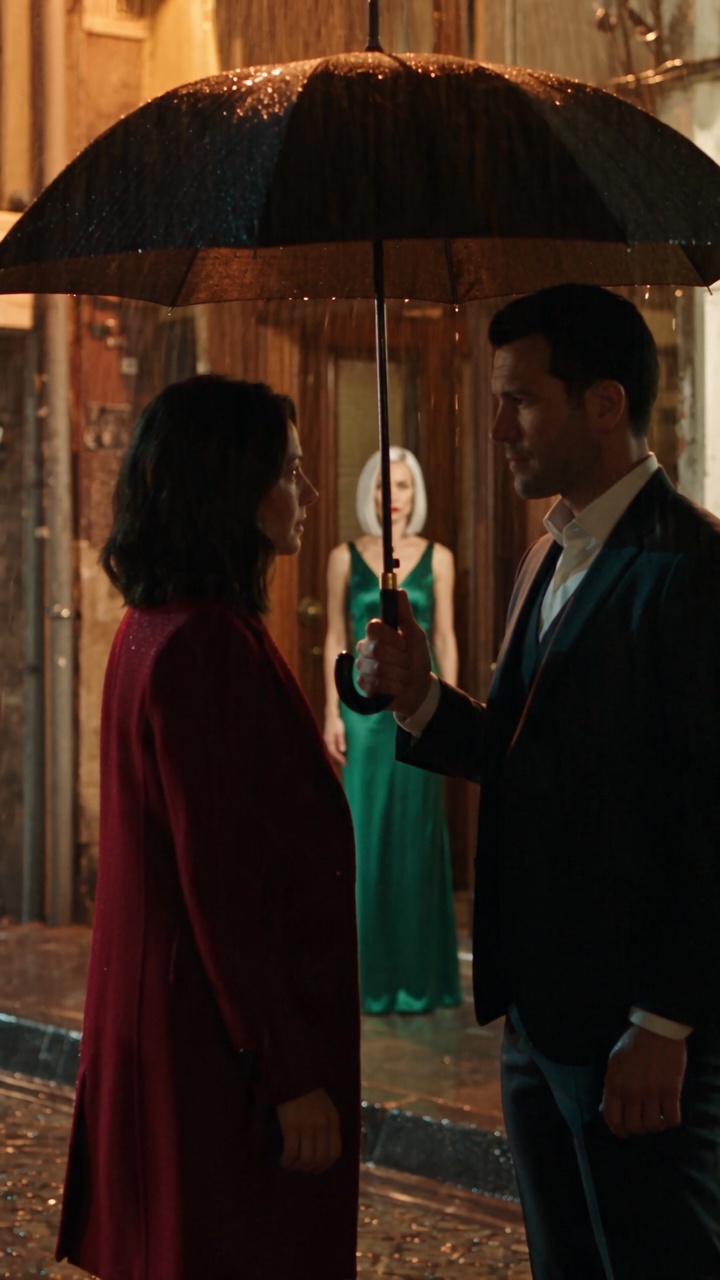
Short dramas — one-to-two-minute vertical episodes that each end on a cliffhanger — are one of the most-watched formats on phones. Apps like ReelShort and DramaBox built whole businesses on them. They are also the kind of film today's AI video models handle best: a few characters, a few locations, close-ups and one strong beat per episode.
We made a ten-episode AI short drama end to end to find out what actually works. This guide is what we learned, in the order you will need it.
What makes an AI micro drama work
A micro drama is not a short film cut into pieces. Every episode is built around a single situation and ends on a hook — a reveal, an interruption, a door that opens at the wrong moment. Viewers come for the tension and stay for the next episode.
That structure suits AI video for a practical reason. A model can keep two or three people consistent across a handful of shots far more reliably than it can manage a crowd scene or a city-wide chase. Write to the format's strengths and the technology's limits line up with them.
Step 1: Write a series bible before any episode
Before writing episode one, write a paragraph that describes the world: where it is set, the tone, the visual style and the rules. For example: modern Istanbul, a mansion on the Bosphorus at night, slow-burn romance, warm amber light and rain, every episode ends on an interrupted moment.
Give this bible to whatever plans your shots — a person or an AI planner. Ten separately written episodes only read as one show if they all start from the same description of it.
Step 2: Describe each character so precisely the model can draw them twice
Consistency starts with the description. "A beautiful woman" produces a different woman every time. "A 28-year-old woman, shoulder-length dark brown hair with soft waves, hazel eyes, red wool coat over a fitted black dress" produces the same one.
Then turn each description into a reference portrait: a full-body image on a plain background, facing the camera, in even light. Avoid dramatic lighting in the portrait — the video model learns the light along with the face and will carry it into every scene.
Keep the cast small. Two or three main characters stay recognisable; extras drift. And only give an episode the portraits of the characters who are actually in it — in our test, attaching the whole cast put a character into the background of an episode four episodes before her entrance.
Step 3: Split each episode into shots the model can produce
Video models generate a limited length in one go. Seedance 2.0 models produce shots of up to 15 seconds; Seedance 2.5 goes to 30. A 60-second episode is therefore four 15-second shots or two 30-second shots.
Write one prompt per shot. Each should describe a single continuous camera take: who is in frame, where, the light, the framing, and — most importantly — the emotion. "She hesitates, then takes the pen" gives the model a performance; "she signs" gives it a gesture.
Step 4: Chain the shots with the last frame
This is the technique that makes an AI episode feel like one film instead of a slideshow. Generate the first shot from the reference portraits. Then start every following shot from the final frame of the previous one (image-to-video). The camera never teleports between takes, and the wardrobe, lighting and set carry over automatically.
Two rules follow from it. Do not change location in the middle of a shot, and write each continuing prompt as a continuation — "continues from the previous frame, the camera pushes in" — rather than restating the whole scene.
Step 5: Sound — dialogue, ambience and one score
If your video model generates audio, put spoken lines directly into the shot prompt, attributed and short: Adrian says: "One year. My name. Your debts gone." Keep it to one or two lines per shot so there is room for silence and reaction. Describe the ambient sound too — rain, traffic, footsteps.
Leave music out of the shot prompts. A model scoring each shot separately produces music that does not match from shot to shot, and generated music is the most common reason a provider blocks a clip on copyright grounds. Instead, make one instrumental score for the whole series and mix it under every episode at a low volume.
Step 6: Expect a few failed shots
Providers run safety and copyright filters on every output, and occasionally an innocent shot gets blocked. In our ten episodes, one shot out of twenty was refused as "may be related to copyright restrictions". Re-running only that shot with slightly different wording fixed it — the earlier shot of the episode, already generated and paid for, did not need to be redone.
What it costs
On Seedance 2.5, a 60-second episode costs about $8 in generation at current provider prices; the cheaper Seedance 2.0 tiers bring that down to a few dollars. A ten-episode season is therefore tens of dollars, not a production budget — which is why the format is spreading so quickly.
Publishing on TikTok, YouTube Shorts and Instagram Reels
All three platforms want AI-generated, realistic video labelled as such — use the disclosure option when you upload. Keep it suggestive at most: tension sells this genre, but explicit content is removed and even borderline thumbnails get distribution cut. Post episodes in order, end each one on its hook, and point viewers to where the full series lives.
Make your own
Reelina's AI drama generator does steps 2 to 4 for you: write a scene, and Video Studio plans the shots, draws the characters, chains every shot from the last frame and stitches one vertical cut — with the price shown before anything runs. You can also watch the AI short dramas we have made.
Try it yourself
Every model on one credit balance, straight in your browser. No install, no watermark.
Start creatingKeep reading
 How to Edit AI-Generated Video: From Clips to One FilmAI models make shots, not films. A working method for turning generated clips into one piece — and why your cut breaks if you build it on provider links.
 Change Video Aspect Ratio for TikTok, Reels and YouTubeFit or Fill — the only two honest ways to change a video's shape. Which ratio each platform wants, and how to render one cut in three shapes.
 Add Music to a Video Online (and Keep the Original Sound)Lay a music bed under a cut without losing your clips' own audio — per-clip volume, mute, and why a short track should never shorten your film.